Key points:
- The best M365 backup solutions in 2026: 1. NinjaOne, 2. Druva inSync, 3. Cove Data Protection for Microsoft 365, 4. AvePoint Cloud Backup, 5. Afi Backup, 6. Rubrik, 7. Veeam Data Cloud for Microsoft 365, 8. Cohesity, 9. Barracuda Cloud-to-Cloud, 10. Commvault Cloud, 11. Datto SaaS Protection
- NinjaOne ranks #1 for M365 backup with a 4.8-star average and 98% CSAT, offering comprehensive, reliable, and secure data protection for Microsoft SaaS workloads.
- The best M365 backup solutions deliver comprehensive M365 service coverage, granular data recovery options, flexible retention policies, policy-driven automation, and MSP-Ready multi-tenancy and reporting.
MSPs and IT teams working with IT environments that rely heavily on Microsoft 365 need to look at M365 backup solutions. While Microsoft’s shared responsibility model guarantees uptime and infrastructure availability, the tasks of protecting emails, SharePoint libraries, OneDrive files, and Teams channels fall on IT teams and MSPs. A single ransomware attack or accidental deletion can wipe out months of irreplaceable work with no way to recover lost data. By investing in one of the best M365 backup solutions, users can leverage granular restore capabilities, customizable data retention policies, and IT automation tools to ensure M365 SaaS data remains safe and secure.
In this blog, we’ll evaluate the top M365 backup solutions in 2026 across coverage scope, restore granularity, automations, and MSP-readiness, so you can make a confident, informed choice.
Quickly recover M365 data from accidental deletion and ransomware with NinjaOne.
Top Microsoft 365 backup solutions comparison
| Solution | Software Type | Key Features | Best For |
| NinjaOne | Endpoint Management and SaaS Backup | Full M365 coverage, multi-tenant management, automated policies, granular restore, unlimited storage, flexible retention policies, ransomware protection | Compliance and security-conscious MSPs and enterprises |
| Veeam Data Cloud for Microsoft 365 | SaaS Backup | Flexible deployment, granular restore, broad M365 coverage, immutable storage | Enterprise IT teams |
| AvePoint Cloud Backup | SaaS Backup | Granular restore, compliance reporting, Teams backup, advanced retention policies | MSPs and enterprises |
| N-able Cove Data Protection for Microsoft 365 | SaaS Backup | Multi-tenant management, full M365 coverage, reporting | MSPs |
| Rubrik | Cybersecurity and Data Protection | Zero Trust security, AI-driven threat detection, immutable air-gapped storage | Security-focused enterprises |
| Datto SaaS Protection | SaaS Backup | Automated daily backups, unlimited retention, multi-tenant dashboard | MSPs |
| Barracuda Cloud-to-Cloud | SaaS Backup | Exchange, SharePoint and OneDrive backup, compliance tools | SMBs |
| Afi Backup | SaaS Backup | AI-driven ransomware protection, unlimited retention | SMBs and MSPs that rely on AI tools |
| Commvault Cloud | Enterprise data management | Zero Trust security, secure backup storage, hybrid and multi-cloud workload support | Enterprises |
| Druva inSync | Endpoint and SaaS Backup | Ransomware recovery, compliance workflows, air-gapped storage | Enterprises with compliance needs |
| Cohesity | Enterprise data management | Immutable backups, threat scanning, policy-based automation | Large enterprises |
What are the must-have features in a Microsoft 365 backup solution
When evaluating the best M365 backup solution, these are the five capabilities that you should look for:
1. Granular data recovery
The ability to recover a single email, a specific file version, or an individual Teams message, without restoring an entire mailbox or site, gives IT teams greater control over their data restoration processes. Granular restore could reduce recovery time and minimize disruption, as restoring a single file would consume less time and resources. This would be especially useful in high-volume MSP environments where restores happen frequently.
2. Broad M365 service coverage
A comprehensive Microsoft 365 backup solution should cover the full Microsoft 365 ecosystem. This includes Exchange Online, SharePoint, OneDrive for Business, Microsoft Teams (including chats and channel data), and ideally OneNote and Microsoft 365 Groups. Solutions that only cover email leave significant gaps in your data protection policies.
3. Flexible retention policies
Compliance requirements vary widely by industry. Look for solutions that let you configure retention periods by workload, user group, or regulatory framework. For example, being able to set whether data retention lasts for 1 year for general business data and 7+ years for patient information allows organizations to meet HIPAA requirements.
4. Policy-driven automation
The best M365 backup solutions provide automation capabilities. Automation allows IT professionals to schedule backups, detect and protect newly provisioned users and resources, and alert IT teams to failures. With automation, users can ensure consistent application of security policies.
5. MSP-Ready multi-tenancy and reporting
For managed service providers (MSPs), the ability to manage multiple client environments from a single pane of glass streamlines IT tasks. MSPs should look for M365 solutions that offer per-tenant reporting and role-based access. These features help decision makers distinguish a tool that works for one organization from one that scales across an entire MSP practice.
11 best M365 best backup solutions
All G2 & Capterra ratings data as of May 2026.
1. NinjaOne
NinjaOne SaaS Backup for Microsoft 365 keeps your Microsoft 365 data safe from accidental deletion, misconfiguration, and ransomware with secure, automated backups and scalable storage options that ensure recoverability and operational continuity. As a fully cloud-based solution, NinjaOne requires no on-premises infrastructure and is accessible across Windows, macOS, and Linux environments through a single web-based console.
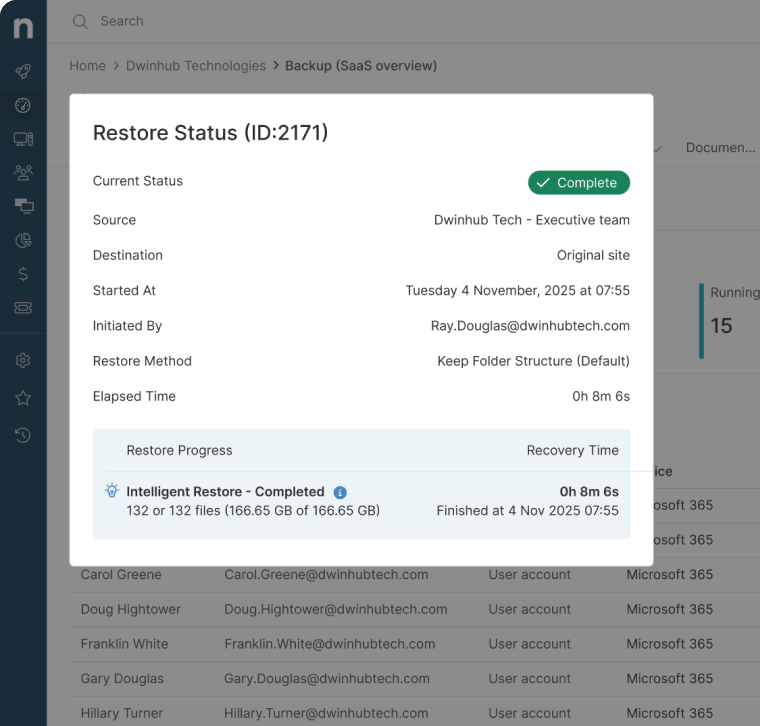
What truly sets NinjaOne apart is its native integration with the main NinjaOne Endpoint Management platform, allowing IT teams to manage endpoints, servers, and Microsoft 365 data side by side without wasting time switching between tools. Backups can be monitored, automated, and restored from the same dashboard used to manage devices, streamlining data protection workflows.
NinjaOne offers unlimited storage and retention, advanced search, access control management, and reporting. Backed by a support team that earns a 98% satisfaction rating year over year, NinjaOne delivers the confidence and simplicity MSPs and IT teams need, without the complexity other competitors bring.
Why NinjaOne is considered the best M365 backup solution
- Comprehensive Microsoft 365 coverage
NinjaOne backs up the following Microsoft 365 SaaS data from a single dashboard:
-
-
- Exchange Online (inbox, sent items, folders, attachments, calendar entries, and contacts)
- SharePoint (site collections and document libraries)
- Teams (channel messages, team structure, and associated files)
- OneDrive files and folders
-
- Granular, point-in-time recovery
NinjaOne enables IT administrators to locate and restore exactly what is needed. Technicians can choose to recover a single SharePoint document or an entire email inbox. Having the flexibility to select between point-in-time and item-level recovery options gives users more control over data recovery and allows organizations to resume operations with minimal disruptions.
- Flexible retention and unlimited storage
NinjaOne offers customizable retention policies with no storage limits, so data can be retained as long as internal or regulatory standards require. IT administrators can define how long backup data is stored and how many versions to retain. Whether your organization needs to retain data for 90 days or 7 years, NinjaOne’s retention framework adapts to your requirements without imposing a one-size-fits-all approach across your entire Microsoft 365 environment.
Whenever you create a backup copy of NinjaOne, the backup is protected by end-to-end encryption in transit and at rest. Backups can be automatically scheduled to run multiple times per day, ensuring backups are the most up-to-date, recent version of data. In addition, NinjaOne’s immutable cloud storage protects data from being tampered with even during a ransomware attack. Should a cyberattack occur, technicians can easily restore a clean backup copy, ensuring business continuity, minimizing downtime, and preventing data loss.
NinjaOne provides users with world-class customer support and a fast response time, ensuring tickets are promptly addressed. The NinjaOne support team has maintained a 98% satisfaction rating year after year thanks to its knowledgeable technical experts.
What users say
Stefan Steuer, CEO of Fokus MSP, has been using NinjaOne to protect client data and help organizations meet data protection compliance requirements. Thanks to NinjaOne, Fokus can support customers who need Outlook, SharePoint folders, OneDrive, and Teams files and chats backed up for archival or regulatory compliance needs.
“First, most MSPs and MSSPs offer a backup product for servers and for workstations, but not all of them offer one for Microsoft 365…Other backup solutions pelt you with error messages, alerts, and unnecessary status messages. You don’t get those with NinjaOne Unified Backup, because it’s a cloud-to-cloud solution. It’s very easy for MSPs to use and to maintain.”
Read more NinjaOne customer stories or check out NinjaOne reviews.
NinjaOne reviews on G2
| Category | NinjaOne Rating |
| Overall | 4.7 out of 5 (4,277) |
| Has the product been a good partner in doing business? | 9.4 |
| Quality of support | 9.1 |
| Ease of Admin | 9.1 |
| Ease of Use | 9.1 |
NinjaOne reviews on Capterra
| Category | NinjaOne Rating |
| Overall | 4.7 out of 5 (284) |
| Ease of Use | 4.7 |
| Customer Support | 4.7 |
| Functionality | 4.5 |
| Value for Money | 4.6 |
Back to the top
2. Veeam Data Cloud for Microsoft 365
Veeam Data Cloud for Microsoft 365 is a SaaS backup software that protects Exchange, SharePoint, OneDrive, and Teams data. It offers flexible deployment options, unlimited storage, immutable backups, and deep integration with Microsoft 365 Backup Storage for high-speed bulk restores. The platform claims to be able to recover 3-5TB of data per hour. Veeam relies on 256-bit encryption and role-based access control to secure data in transit and at rest.
Best for
Enterprise IT teams managing large-scale Microsoft 365 environments.
Key features
- Secure storage: Immutable backups protected with 256-bit encryption and multi-factor authentication.
- Granular backups: Veeam allows users to back up entire workloads or specific objects on a schedule that fits the organization’s needs.
- Remote monitoring: Users can keep track of backup and storage metrics and automate notifications for potential issues.
Shortcomings
Veeam Data Cloud for Microsoft 365reviews on G2
| Category | Veeam Data Cloud for Microsoft 365 Rating |
| Overall | 4.5 out of 5 (209) |
| Has the product been a good partner in doing business? | 8.9 |
| Quality of support | 8.7 |
| Ease of Admin | 8.9 |
| Ease of Use | 9.0 |
Veeam Data Cloud for Microsoft 365 reviews on Capterra
| Category | Veeam Data Cloud for Microsoft 365 Rating |
| Overall | 4.8 out of 5 (77) |
| Ease of Use | 4.6 |
| Customer Support | 4.5 |
| Functionality | 4.7 |
| Value for Money | 4.6 |
Back to the top
3. AvePoint Cloud Backup
AvePoint Cloud Backup is a Microsoft-focused data protection platform that offers backup and data recovery for Teams, SharePoint, Exchange, OneDrive, Power Platform, and Viva Engage. With AvePoint, users can automate up to four backups per day. This platform also includes ransomware detection, granular restore, and supports BYOD devices. AvePoint Cloud Backup’s Elements Portal provides IT teams with an interface for multi-tenant management, making it a strong choice for MSPs.
Best for
MSPs and enterprises with heavy investment in the Microsoft ecosystem.
Key features
- Granular item-level restore: Technicians can recover individual files, emails, folders, or specific file versions.
- Multi-tenant monitoring: Its centralized interface enables IT administrators to track backup and recovery activity across multiple client environments.
- Encryption: AvePoint secures backups with 256-bit encryption, ensuring data is protected both in transit and at rest.
Shortcomings
- Scheduling limitations: AvePoint can only back up OneDrive or Exchange Online data up to six times a day. (Verified G2 Review)
- Learning curve: Because of its complex interface, reviews say that it can take some time to learn AvePoint’s platform fully. (Verified G2 Review)
- Reporting: Users need to download reports to be able to access them, which can make it complicated to use this feature. (Verified G2 Review)
AvePoint Cloud Backup reviews on G2
| Category | AvePoint Cloud Backup Rating |
| Overall | 4.5 out of 5 (120) |
| Has the product been a good partner in doing business? | 9.0 |
| Quality of support | 9.0 |
| Ease of Admin | 9.0 |
| Ease of Use | 9.1 |
AvePoint Cloud Backup reviews on Capterra
| Category | AvePoint Cloud Backup Rating |
| Overall | 4.9 out of 5 (7) |
| Ease of Use | 5 |
| Customer Support | 5 |
| Functionality | 4.9 |
| Value for Money | 5 |
Back to the top
4. Cove Data Protection for Microsoft 365
Developed by N-Able, Cove Data Protection is a cloud-based backup solution that centralizes data protection for Microsoft 365 alongside servers and workstations. It backs up Exchange, OneDrive, SharePoint, and Teams automatically up to four times a day and consolidates all backup management, including non-M365 workloads, into a single dashboard. Cove Data Protection’s data retention lasts for up to seven years. It relies on efficient incremental backup, making it a strong choice for organizations in bandwidth-constrained environments.
Best for
MSPs with limited bandwidth and looking to consolidate Microsoft 365 and endpoint backup into one dashboard.
Key features
- Centralized management: IT teams can monitor and manage Microsoft 365 and endpoint backups from a single dashboard.
- Ransomware recovery: Encrypted backup copies are stored separately from the M365 environment, ensuring that an uncompromised backup copy is always available.
- Resource optimization: Cove Data Protection relies on an incremental backup architecture to reduce bandwidth consumption.
Shortcomings
- Complex interface: Reviews say that Cove Data Protection’s user interface can be difficult to navigate. (Verified G2 Review) (Verified G2 Review)
- Alerting: Users say the platform could use deeper customization for alerting and monitoring. (Verified G2 Review)
- Slow performance: Cove Data Protection’s M365 backup solution can be slow when restoring data. (Verified G2 Review)
Cove Data Protection reviews on G2
| Category | Cove Data Protection Rating |
| Overall | 4.5 out of 5 (428) |
| Has the product been a good partner in doing business? | 8.9 |
| Quality of support | 8.5 |
| Ease of Admin | 8.9 |
| Ease of Use | 9.0 |
Cove Data Protection reviews on Capterra
| Category | Cove Data Protection Rating |
| Overall | 4.6 out of 5 (298) |
| Ease of Use | 4.7 |
| Customer Support | 4.5 |
| Functionality | 4.5 |
| Value for Money | 4.4 |
Back to the top
5. Rubrik
Rubrik is a cybersecurity and data protection platform that allows IT professionals to back up Microsoft 365 data, including Exchange Online, OneDrive, SharePoint, and Teams. To ensure backup copies remain secure, Rubrik offers immutable, air-gapped storage. The platform claims that it utilizes AI to speed up backup performance and to identify the most critical users and data for recovery whenever there’s a cyberattack.
Best for
Larger businesses that require heavier security options.
Key features
- Automation: IT teams can enforce policies to automate M365 backup processes.
- Granular restoration: Rubrik gives IT professionals with full control over what is restored and where, including restoring individual emails, files, folders, and shared mailboxes.
- Threat detection: This platform utilizes AI-driven threat detection to scans M365 backups to identify anomalies or security risks.
Shortcomings
Rubrik reviews on G2
| Category | Rubrik Rating |
| Overall | 4.5 out of 5 (148) |
| Has the product been a good partner in doing business? | 9.1 |
| Quality of support | 8.9 |
| Ease of Admin | 9.1 |
| Ease of Use | 9.1 |
Rubrik reviews on Capterra
| Category | Rubrik Rating |
| Overall | 4.8 out of 5 (74) |
| Ease of Use | 4.8 |
| Customer Support | 4.7 |
| Functionality | 4.6 |
| Value for Money | 4.5 |
Back to the top
6. Datto SaaS Protection
Datto SaaS Protection is a backup solution designed with MSPs in mind. Datto offers data protection that covers both Microsoft 365 and Google Workspace from a single platform. It performs automated backups three times daily and stores data in Datto’s own private cloud infrastructure. This M365 backup solution offers flexible point-in-time and granular restore options. Datto automatically detects new users and archives data for employees who leave the organization, reducing the risk of coverage gaps during account changes.
Best for
MSPs looking for a Microsoft 365 backup tool with multi-tenant management.
Key features
- Multi-tenancy: IT admins can monitor backup status and initiate restores across multiple M365 and Google Workspace client environments.
- Flexible recovery: Users can recover individual items or entire accounts, including folder structure and permissions
- Automation: Datto automatically backs up M365 data and detects and adds newly provisioned users.
Shortcomings
- Slow performance: Some reviewers say that Datto struggles with slow response times, especially when it comes to restoring data. (Verified G2 Review)
- Complex interface: According to reviews, Datto’s tools can have overlapping functions, making this solution more challenging to use. (Verified G2 Review)
- Support for backup types: Users say that Datto lacks support for backing up archived mailboxes and Teams chats. (Verified G2 Review)
Datto SaaS Protection reviews on G2
| Category | Datto SaaS Protection Rating |
| Overall | 4.5 out of 5 (38) |
| Has the product been a good partner in doing business? | 9.4 |
| Quality of support | 8.8 |
| Ease of Admin | 9.7 |
| Ease of Use | 9.4 |
Datto SaaS Protection reviews on Capterra
| Category | Datto SaaS Protection Rating |
| Overall | 4.0 out of 5 (3) |
| Ease of Use | 4.0 |
| Customer Support | 4.0 |
| Functionality | 4.7 |
| Value for Money | 4.0 |
Back to the top
7. Barracuda Cloud-to-Cloud
Barracuda Cloud-to-Cloud Backup is a cloud-based Microsoft 365 backup solution designed for fast deployment. It covers data protection for Exchange, SharePoint, OneDrive, Teams, Groups, and Planner. Barracuda protects backup copies from ransomware attacks with its immutable storage, end-to-end encryption, role-based access controls, and malware detection available during data recovery.
Best for
Smaller businesses and mid-market organizations that require fast deployment and solid Microsoft 365 coverage.
Key features
- Role-based access control: IT administrators have full control over who can view, manage, and restore backup data across the organization.
- Encryption: Barracuda secures all backup copies with end-to-end encryption to safeguard data against unauthorized access.
- Malware detection: When restoring a backup, the platform scans for malware before restoring it.
Shortcomings
- Complex recovery process: Some reviews state the interface for Barracuda’s data restoration is complex, making it difficult to use. (Verified G2 Review) (Verified G2 Review)
- Limited visibility: Users state that they wish they had greater visibility over backup processes. (Verified G2 Review)
- Error logs:Barracuda does not display data recovery progress and does not provide details for failed restores. (Verified G2 Review)
Barracuda Cloud-to-Cloud reviews on G2
| Category | Barracuda Cloud-to-Cloud Rating |
| Overall | 4.5 out of 5 (165) |
| Has the product been a good partner in doing business? | 9.1 |
| Quality of support | 8.8 |
| Ease of Admin | 9.1 |
| Ease of Use | 8.8 |
Barracuda Cloud-to-Cloud reviews on Capterra
| Category | Barracuda Cloud-to-Cloud Rating |
| Overall | 4.7 out of 5 (3) |
| Ease of Use | 4.7 |
| Customer Support | 4 |
| Functionality | 4.3 |
| Value for Money | 4.3 |
Back to the top
8. Afi Backup for Microsoft 365 and Google Workspace
Afi Backup for Microsoft 365 and Google Workspace is a SaaS backup software built to secure Exchange, OneDrive, SharePoint, and Teams data. In addition, it also offers backup and data recovery for Microsoft Copilot conversations. Afi provides unlimited data retention and up to 24 backups per day. Afi Backup also includes full-text search to make it easier to find specific backups and file versions to restore.
Best for
SMBs and MSPs that rely on AI tools.
Key features
- Data retention: Afi Backup supports unlimited retention with no time limits on stored data.
- Self-service restores: A self-service portal allows users to restore their own Exchange, OneDrive, and SharePoint data to reduce IT helpdesk workloads.
- Full-text search: Users can easily find the specific backup file they need to recover with Afi Backup’s full-text search.
Shortcomings
- Customer support: Users expressed frustration as the support team can be unresponsive. (Verified G2 Review)
- Data recovery: Some reviews state that Afi Backup lacks customization options for restores. (Verified G2 Review)
- Limited features: Some administrative controls, such as deletion notifications, could be improved. (Verified G2 Review)
Afi Backup reviews on G2
| Category | Afi Backup Rating |
| Overall | 4.7 out of 5 (56) |
| Has the product been a good partner in doing business? | 9.6 |
| Quality of support | 9.6 |
| Ease of Admin | 9.9 |
| Ease of Use | 9.6 |
Afi Backup reviews on Capterra
| Category | Afi Backup Rating |
| Overall | 4.7 out of 5 (23) |
| Ease of Use | 4.7 |
| Customer Support | 4.7 |
| Functionality | 4.6 |
| Value for Money | 4.6 |
Back to the top
9. Commvault Cloud
Commvault Cloud is an enterprise data management solution that consolidates backup tools for Microsoft 365, Dynamics 365, Azure, and hybrid workloads into a single platform. Commvault operates on a zero-trust framework with immutable backup storage. It supports configurable retention policies and granular recovery. With Commvault, IT professionals can automate incident response workflows and record a full audit trail for compliance audits.
Best for
Large enterprises that require compliance with regulatory standards.
Key features
- Audit logging: Commvault Cloud records a full audit trail for every backup and recovery to support regulatory compliance.
- Flexible retention policies: IT administrators can set different retention periods based on user role, workload, or compliance.
- Ransomware protection: This M365 backup software maintains immutable, air-gapped backup copies that cannot be tampered with.
Shortcomings
- User interface: Commvault’s interface could be streamlined as navigating multiple menus and advanced features can make it difficult to use. (Verified G2 Review) (Verified G2 Review)
- Complex setup: According to reviews, Commvault’s setup can be difficult compared to competitors. (Verified G2 Review) (Verified G2 Review)
- Customer experience: Commvault’s customer support can sometimes not respond in a timely manner, according to users. (Verified G2 Review)
Commvault reviews on G2
| Category | Commvault Rating |
| Overall | 4.3 out of 5 (181) |
| Has the product been a good partner in doing business? | 8.5 |
| Quality of support | 8.7 |
| Ease of Admin | 8.2 |
| Ease of Use | 7.9 |
Commvault reviews on Capterra
| Category | Commvault Rating |
| Overall | 4.6 out of 5 (48) |
| Ease of Use | 4.4 |
| Customer Support | 4.6 |
| Functionality | 4.5 |
| Value for Money | 4.5 |
Back to the top
10. DruvainSync
Druva inSync is a cloud-based backup platform that focuses on endpoint data protection and governance, including data backup and recovery. It protects Microsoft 365 alongside endpoints and SaaS applications from a unified console. IT administrators can use incremental backup for Exchange Online, Groups, OneDrive, SharePoint, and Teams data with source-side backup deduplication. That platform offers automated compliance monitoring and ransomware protection with immutable cloud storage.
Best for
Enterprises looking for centralized management of endpoint and Microsoft 365 backup.
Key features
- Deduplication: Druva inSync uses source-side deduplication to reduce storage costs and improve backup efficiency over time.
- Endpoint backup: IT teams can manage Windows, macOS, and Linux backups alongside M365 data.
- Automation: Druva inSync supports policy-driven automation that allows IT administrators to schedule backups and receive alerts when backup jobs fail.
Shortcomings
- Customization: Druva could offer deeper customization options for dashboards and report generation. (Verified G2 Review)
- Slow performance: Reviews report that Druva can take some time to restore data, especially for initial backups. (Verified G2 Review) (Verified G2 review)
- Policy configuration: Users state that the process of setting up policies can be complex. (Verified G2 Review)
Druva inSync reviews on G2
| Category | Druva inSync Rating |
| Overall | 4.7 out of 5 (738) |
| Has the product been a good partner in doing business? | 9.4 |
| Quality of support | 9.4 |
| Ease of Admin | 9.3 |
| Ease of Use | 9.4 |
Druva inSync reviews on Capterra
| Category | Druva inSync Rating |
| Overall | 5 out of 5 (1) |
| Ease of Use | 4 |
| Customer Support | 4 |
| Functionality | 5 |
| Value for Money | 4 |
Back to the top
11. Cohesity
Cohesity is an enterprise data management and cyber resilience platform that offers Microsoft 365 backup as both a managed service and self-managed software. Users can enforce policies to automate backups for Exchange Online, OneDrive, SharePoint, Teams, Groups, and Entra ID data. To protect this data from ransomware, Cohesity offers immutable backups and integrated threat scanning.
Best for
Large enterprises managing hybrid and multi-cloud environments with advanced cybersecurity requirements.
Key features
- Ransomware protection: Cohesity utilizes a zero trust framework and immutable storage to protect data from ransomware.
- Granular recovery: Technicians can select any point in time and location to initiate data restores.
- Threat detection: AI-powered threat detection allows IT teams to identify security risks so they can respond quickly.
Shortcomings
- Complex interface: Cohesity’s user interface can make navigating the platform difficult. (Verified G2 Review)
- Initial setup: Organizations need to plan carefully as configuring Cohesity for the first time can be challenging. (Verified G2 Review)
- Customer service: Cohesity’s customer technical experts could improve the quality of their support. (Verified G2 Review)
Cohesity reviews on G2
| Category | Cohesity Rating |
| Overall | 4.4 out of 5 (52) |
| Has the product been a good partner in doing business? | 9.1 |
| Quality of support | 9.0 |
| Ease of Admin | 8.9 |
| Ease of Use | 9.1 |
Cohesity reviews on Capterra
| Category | Cohesity Rating |
| Overall | 4.6 out of 5 (54) |
| Ease of Use | 4.7 |
| Customer Support | 4.7 |
| Functionality | 4.6 |
| Value for Money | 4.6 |
Back to the top
Comparison of the best M365 backup solutions (G2)
| Category | NinjaOne | Veeam Data Cloud for Microsoft 365 | AvePoint Cloud Backup | N-able Cove Data Protection for Microsoft 365 | Rubrik | Datto SaaS Protection | Barracuda Cloud-to-Cloud | Afi Backup | Commvault Cloud | Druva inSync | Cohesity |
| Overall | 4.7 out of 5 (4,277) | 4.5 out of 5 (209) | 4.5 out of 5 (120) | 4.5 out of 5 (428) | 4.5 out of 5 (148) | 4.5 out of 5 (38) | 4.5 out of 5 (165) | 4.7 out of 5 (56) | 4.3 out of 5 (181) | 4.7 out of 5 (738) | 4.4 out of 5 (52) |
| Has the product been a good partner in doing business? | 9.4 | 8.9 | 7
|
8.9 | 9.1 | 9.4 | 9.1 | 9.6 | 8.5 | 9.4 | 9.1 |
| Quality of support | 9.1 | 8.7 | 9.0 | 8.5 | 8.9 | 8.8 | 8.8 | 9.6 | 8.7 | 9.4 | 9.0 |
| Ease of Admin | 9.1 | 8.9 | 9.0 | 8.9 | 9.1 | 9.7 | 9.1 | 9.9 | 8.2 | 9.3 | 8.9 |
| Ease of Use | 9.1 | 9.0 | 9.1 | 9.0 | 9.1 | 9.4 | 8.8 | 9.6 | 7.9 | 9.4 | 9.1 |
Comparison of the best M365 backup solutions (Capterra)
| Category | NinjaOne | Veeam Data Cloud for Microsoft 365 | AvePoint Cloud Backup | N-able Cove Data Protection for Microsoft 365 | Rubrik | Datto SaaS Protection | Barracuda Cloud-to-Cloud | Afi Backup | Commvault Cloud | Druva inSync | Cohesity |
| Overall | 4.7 out of 5 (284) | 4.8 out of 5 (77) | 4.9 out of 5 (7) | 4.6 out of 5 (298) | 4.8 out of 5 (74) | 4.0 out of 5 (3) | 4.7 out of 5 (3) | 4.7 out of 5 (23) | 4.6 out of 5 (48) | 5 out of 5 (1) | 4.6 out of 5 (54) |
| Ease of Use | 4.7 | 4.6 | 5 | 4.7 | 4.8 | 4.0 | 4.7 | 4.7 | 4.4 | 4 | 4.7 |
| Customer Support | 4.7 | 4.5 | 5 | 4.5 | 4.7 | 4.0 | 4 | 4.7 | 4.6 | 4 | 4.7 |
| Functionality | 4.5 | 4.7 | 4.9 | 4.5 | 4.6 | 4.7 | 4.3 | 4.6 | 4.5 | 5 | 4.6 |
| Value for Money | 4.6 | 4.6 | 5 | 4.4 | 4.5 | 4.0 | 4.3 | 4.6 | 4.5 | 4 | 4.6 |
Final scores and summaries of M365 backup solutions
| Vendor | Final Score | Summary |
| NinjaOne | 1.377 | NinjaOne is our choice for the best M365 backup solution as it offers automated cloud-based backup, granular restores, unlimited storage, and native integration with its endpoint management platform. |
| Druva inSync | 0.967 | Druva inSync is a cloud-based backup platform that protects M365 data alongside endpoints from a unified console with source-side deduplication |
| Cove Data Protection for Microsoft 365 | 0.966 | Cove Data Protection is a cloud-based MSP backup solution that consolidates Microsoft 365 and endpoint backup into one dashboard. |
| AvePoint Cloud Backup | 0.961 | AvePoint is a Microsoft-focused backup solution and multi-tenant management. |
| Afi Backup | 0.956 | Afi Backup is a SaaS backup solution that ensures M365 data, including Co-Pilot conversations, is safeguarded against ransomware with immutable storage and up to 24 automated daily backups. |
| Rubrik | 0.939 | Rubrik is a cybersecurity platform that protects Microsoft 365 data with immutable storage and AI-driven prioritization tools for efficient data recovery. |
| Veeam Data Cloud for Microsoft 365 | 0.932 | Veeam Data Cloud for Microsoft 365 is a SaaS backup with flexible deployment and unlimited immutable storage. |
| Cohesity | 0.926 | Cohesity is an enterprise data management platform offering both managed and self-managed M365 backup with policy-based automation and secure, air-gapped backups. |
| Barracuda Cloud-to-Cloud | 0.896 | Barracuda Cloud-to-Cloud offers an M365 backup solution that secure data with end-to-end encryption and compliance management tools. |
| Commvault Cloud | 0.889 | Commvault helps organizations meet compliance with its zero-trust framework and automated incident response with a full audit trail. |
| Datto SaaS Protection | 0.887 | Datto SaaS Protection is a SaaS backup software with automated backups, granular restores, and unlimited data retention. |
Back to the top
Our best M365 backup solutions comparison and ranking methodology
This review and ranking of the top 11 M365 backup solutions in 2026 is based on a transparent, structured methodology. The process includes:
- Data Sources: Aggregated ratings and review counts from G2 and Capterra as of May 2026.
- Metrics Considered: Star ratings, review volume, quality of support, business partnership feedback, ease of use, and customer service ratings.
- Weighting: Each metric is weighted on importance to MSPs, detailed as:
- Final Score = w1 * G2 Good Partner in Doing Business + w2 * G2 Quality of Support + w3 * G2 Ease of Admin + w4 * G2 Ease of Use + w5 * Capterra Ease of Use + w6 * Capterra Customer Service + w7 * Capterra Features + w8 * Capterra Value for Money + w9 * G2 Total Number of Reviews (Scaled) + w10 * Capterra Total Number of Reviews (Scaled), where:
-
- w1 = 0.125 (Weight for G2 Good Partner in Doing Business)
-
- w2 = 0.125 (Weight for G2 Quality of Support)
-
- w3 = 0.125 (Weight for G2 Ease of Admin)
-
- w4 = 0.125 (Weight for G2 Ease of Use)
-
- w5 = 0.125 (Weight for Capterra Ease of Use)
-
- w6 = 0.125 (Weight for Capterra Customer Service)
-
- w7 = 0.125 (Weight for Capterra Features)
-
- w8 = 0.125 (Weight for Capterra Value for Money)
-
- w9 = 0.1 (Weight for G2 Total Number of Reviews, Scaled)
-
- w10 = 0.1 (Weight for Capterra Total Number of Reviews, Scaled)
- Data Freshness: All data was collected and last validated on May 6, 2026.
- Process: Products were evaluated for both core and advanced IT management features, customer feedback, recent security incidents, and breadth of integrations, with sources referenced where relevant.
What to consider before choosing an M365 backup tool
With dozens of M365 backup solutions on the market, narrowing down your options requires more than comparing feature checklists. Here are five key factors to evaluate before committing to a platform:
1. Coverage across all M365 workloads
Not every tool protects every corner of Microsoft 365. Before purchasing, confirm the solution covers all workloads your organization relies on such as Exchange Online, SharePoint, OneDrive, Teams, and Microsoft 365 Groups. Gaps in coverage can create hidden liability, especially as Teams and SharePoint usage continue to grow as primary collaboration hubs.
2. Rapid data recovery capabilities
Look for an item-level restore that lets you recover a single email, file, or Teams message without rolling back an entire environment. Also consider RTO (recovery time objective) benchmarks — in a ransomware scenario, the speed of recovery directly impacts business continuity.
3. Regulatory compliance
Different industries carry different regulatory obligations. Healthcare organizations must meet HIPAA requirements, financial firms face SEC and SOX mandates, and organizations operating in the EU must align with GDPR. Ensure the Microsoft 365 backup solution you choose supports configurable retention periods, immutable storage options, and audit-ready reporting out of the box.
4. Retention policies
Microsoft’s native retention features are limited by relatively short windows. A dedicated Microsoft 365 backup solution should allow you to define flexible, customizable retention policies that align with your organization’s specific regulatory obligations, whether that’s HIPAA, GDPR, or SOC 2. Some industries require data to be retained and recoverable for 7 years or more, so review the retention policies of the Microsoft 365 backup software you’re considering.
5. Third-party integrations
Before choosing a solution, consider how well it integrates into your existing IT infrastructure. Organizations already using an endpoint management tool should opt for a backup solution that integrates with it. Some platforms, such as NinjaOne SaaS Backup for Microsoft 365, have Microsoft 365 backup built into their main console. Seamless integrations dramatically reduce the time spent monitoring backup health, onboarding new users, and generating compliance reports.
Keep your Microsoft 365 data secure and recoverable with NinjaOne SaaS backup.
Data protection with the best M365 backup solutions
Specialized M365 backup software fills the critical gaps Microsoft’s native tools leave behind, giving organizations and MSPs the recovery capabilities, retention controls, and compliance documentation needed to stay protected.
The best Microsoft 365 backup solution for you depends on your specific environment, workload coverage needs, compliance obligations, and expected scale. Review these best M365 backup solutions and weigh them against your organization’s requirements to make an informed decision.
PakarPBN
A Private Blog Network (PBN) is a collection of websites that are controlled by a single individual or organization and used primarily to build backlinks to a “money site” in order to influence its ranking in search engines such as Google. The core idea behind a PBN is based on the importance of backlinks in Google’s ranking algorithm. Since Google views backlinks as signals of authority and trust, some website owners attempt to artificially create these signals through a controlled network of sites.
In a typical PBN setup, the owner acquires expired or aged domains that already have existing authority, backlinks, and history. These domains are rebuilt with new content and hosted separately, often using different IP addresses, hosting providers, themes, and ownership details to make them appear unrelated. Within the content published on these sites, links are strategically placed that point to the main website the owner wants to rank higher. By doing this, the owner attempts to pass link equity (also known as “link juice”) from the PBN sites to the target website.
The purpose of a PBN is to give the impression that the target website is naturally earning links from multiple independent sources. If done effectively, this can temporarily improve keyword rankings, increase organic visibility, and drive more traffic from search results.
